Why?
I started this project in the summer of 2025 after reading this wonderful article by Rob Pruzan. Since then, it's been a fun side project, and I've finally gotten it to a point where I wanted to share. I didn't necessarily have a goal in mind when starting this project, but surprisingly, it's opened up a lot of possibilities for me. Some open source projects I'm interested in, like HonoX and Rari, have similar concepts to what I implemented for this project.
Here is the repo if you want to follow along with this article: link
As part of this project, I built a lightweight React clone with a virtual DOM, a custom renderer and reconciler, key-based reconciliation, and a lot of the hooks (useState, useEffect, useRef, useMemo, useCallback, useReducer, useLayoutEffect).
Context
Before frameworks like React existed, interactivity on websites required you to manually update the DOM in response to events. You had to listen for user interactions, query the DOM, and mutate it using tools like jQuery.
The developer was responsible for keeping the UI in sync with the application state. React introduced a new way of creating web apps that abstract this away. With React, you define some state and React handles updating the DOM based on state changes. (Important note: React wasn't the first framework to do this, but it popularized the approach)
I wanted to explore how React does this for you using concepts like the virtual DOM, reconciliation, and hooks, which is what I'll be explaining :)
Virtual DOM basics
To understand the virtual DOM, you first need to understand the DOM itself. The DOM is how the browser represents your page and knows what to update. More info here.
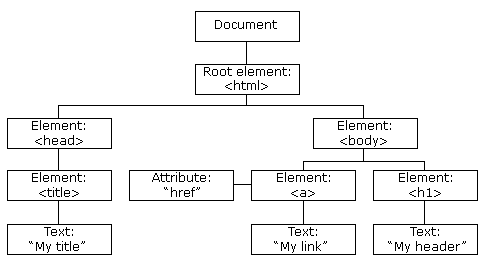
React takes a different approach. React actually creates a lightweight representation of this DOM in memory, called the virtual DOM. Remember that React manages state for you, so when you change some state, React needs to be able to update the DOM on its own rather than the developer doing this. To understand what part of the DOM to change, React maintains this virtual DOM.
Before this whole project, I’d heard of the virtual DOM, but it was still a mystical concept that I only vaguely understood. In the end, it’s just a tree of JavaScript objects that describes what the UI should look like.
When state changes in your React app, React generates a new virtual DOM tree. It then compares this new virtual DOM tree with your previous virtual DOM tree to determine what exactly changed. This process is called diffing.
Diffing allows React to compute the set of updates required to synchronize the real DOM with the new virtual DOM. The full process of updating the UI to match the new virtual DOM state is called reconciliation.
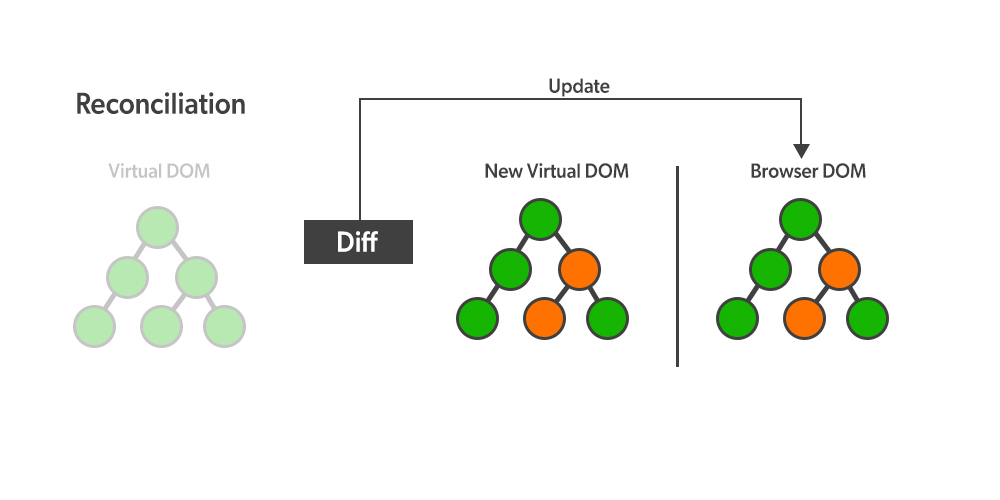
In this diagram, the left tree is the previous virtual DOM, the middle tree is the new virtual DOM after state changes, and the right tree is the real browser DOM. React diffs the left and middle trees, figures out which nodes changed (orange), and then applies only those updates to the real DOM on the right. The key point here is that we don’t rebuild the whole DOM. We only patch the parts that changed.
Rendering to the DOM
To start off, it is important to know that JSX just compiles into JavaScript. So let's say you have a index.jsx file and within that file you have something like
  const App = () => {
    return (
      <div id="hi">
        <h1>test</h1>
      </div>
    );
  };
A tool like Babel takes this code and converts it into createElement function calls before the code runs in the browser. So the above code would turn into this:
  React.createElement(
    "div",
    {id: "hi"},
    React.createElement("h1", null, "test")
  );
As you can see, the generated JavaScript code maintains the same structure as the HTML code, but represented as arguments and nested function calls. This createElement function takes these arguments:
- Element type (div, h1, etc.)
- Props object
- Any number of children.
That return value is just a plain JavaScript object. Think of each object as a single virtual DOM node, and the nested children arrays are what make it a tree. That tree is what React uses during reconciliation.
So in my React-lite, createElement is the actual function that builds those virtual DOM node objects. Here’s a simplified version of it:
  const React = {
    createElement: (type, props, ...children) => {
      return {
        type,
        props: props || {},
        children: children.flat(),
      };
    }
  };
Using this createElement implementation, our earlier JSX example becomes:
{
  type: "div",
  props: { id: "hi" },
  children: [
    {
      type: "h1",
      props: {},
      children: ["test"]
    }
  ]
}

As you can see this createElement implementation is just making the earlier nested function call structure into a cleaner object. We do this to make reconciliation easier for ourselves.
Now that we can describe what the UI should look like in plain JavaScript objects, we need a way to turn this virtual DOM tree into actual DOM nodes in the browser.
The virtual DOM is just a tree of plain JavaScript objects. To display anything on the screen, we need to traverse this tree and create corresponding DOM nodes. Thus, rendering is just a tree traversal problem.
Let’s start with this implementation:
function render(vnode, container) {
  // 1) Text node
  if (typeof vnode === "string" || typeof vnode === "number") {
    container.appendChild(document.createTextNode(String(vnode)));
    return;
  }

  // 2) Function component
  if (typeof vnode.type === "function") {
    const childVNode = vnode.type({ ...(vnode.props || {}), children: vnode.children });
    render(childVNode, container);
    return;
  }

  // 3) Host element
  const domNode = document.createElement(vnode.type);
  vnode.children.forEach(child => render(child, domNode));
  container.appendChild(domNode);
}
Since each virtual node can have children, and those children can have children themselves, we recursively call render() for each child. Essentially, we’re performing DFS of the virtual DOM tree, creating corresponding DOM nodes as we go.
To mount the application, we simply call render with a root virtual node and a container element.
const root = document.getElementById("root");

render(<App />, root);
And with that, we have rendered something to the screen!
Re-rendering and the Problem With Naive Updates
Great, we rendered something to the screen, but we're missing a core part of React: re-rendering when state changes.
Right now, the only way to update the UI is to call render() again with a brand new virtual DOM tree.
For example:
let count = 0;

function increment() {
  count++;
  render(<App count={count} />, root);
}
This technically works, but it's naive. Every update re-renders the entire tree from the root down. For a large application, this gets expensive fast and you can start losing little DOM state things (input focus, scroll position, etc). So we need a smarter way to update only what actually changed.
Reconciliation Strategy
Reconciliation is just the process of syncing the real DOM with the new virtual DOM. The smarter strategy is to keep the previous virtual DOM tree around, generate the next one, compare them, and apply the smallest possible set of DOM mutations.
At a high level, my reconciler does three checks as it walks the tree:
- Node type changed ("div" -> "span", or component type changed) => replace the node.
- Same type, props changed => update attributes/event listeners.
- Children changed => reconcile children (with keys if provided).
Here's a simplified idea of the diff:
function reconcile(parentDom, oldVNode, newVNode) {
  // 1) The vdom node was removed
  if (newVNode == null) {
    parentDom.removeChild(oldVNode.dom);
    return;
  }

  // 2) Create this new vdom node
  if (oldVNode == null) {
    const newDom = createDom(newVNode);
    parentDom.appendChild(newDom);
    return;
  }

  // 3) Replace if different type
  if (oldVNode.type !== newVNode.type) {
    const newDom = createDom(newVNode);
    parentDom.replaceChild(newDom, oldVNode.dom);
    return;
  }

  // 4) Update props + reconcile children
  updateProps(oldVNode.dom, oldVNode.props, newVNode.props);
  reconcileChildren(oldVNode.dom, oldVNode.children, newVNode.children);
}
Notice in the snippet above I’m doing things like oldVNode.dom and parentDom.replaceChild(...). That only works because I attach the real DOM node onto each vnode as a dom field. So when we diff, we already have a direct handle to the element we need to update with no DOM querying required. This makes things way simpler.
For children, the naive approach is "diff by index" (child 0 with child 0, child 1 with child 1, etc). This breaks when you insert at the start of a list because everything shifts. That's what key-based reconciliation is for. If children have stable keys, we can match old and new children by key instead of index and move/insert/remove the right ones. (this is why React always bothers you about missing keys in lists)
This is the core idea behind reconciliation! Keep the old tree, compare it to the new tree, and patch the DOM minimally (the leetcode practice pays off here).
Component Model
In React, we often use components to modularize our UI, but how can we handle reconciliation with components in our version of React? In the end, a component is just a function and calling that function returns a vnode tree.
When the renderer hits a vnode whose type is a function, it calls that function with props and uses whatever it returns as the real child to render.
Here’s the tiny bit of logic that makes components work (same idea as earlier):
if (typeof vnode.type === "function") {
  const childVNode = vnode.type({ ...(vnode.props || {}), children: vnode.children });
  render(childVNode, container);
  return;
}
Components still return regular virtual DOM nodes, so the reconciler doesn't need to account for it in a special way.
One thing to note is that components need identity across renders. React uses the function reference (and key if you’re in a list) to decide if it’s the same component or a new one. That identity is what lets state and hooks attach to the right component later. I didn’t fully implement this in my version since I overlooked this at the start, but for a full implementation, you would want to account for this.
State and setState
Finally we can talk about state. State is the core idea behind React and lets your UI change over time without you manually touching the DOM.
Here’s a common example in React of keeping track of some count state:
const [count, setCount] = useState(0);
Looking at this line, we can tell that in order to implement this ourselves, we need a useState function that takes one parameter (the initial value) and returns an array with the value and a function to change that value.
A super naive approach would be to just have a global "count" variable and keep it in sync with this.
For example, the naive version might look like this:
// BAD EXAMPLE
let count = 0;

function useState(initial) {
  return [count, (next) => {
    // Support both setCount(5) and setCount(prev => prev + 1)
    count = typeof next === "function" ? next(count) : next;
    rerender();
  }];
}
This obviously falls apart for multiple reasons: we’re only supporting one piece of state, it’s tied to a single variable, and it doesn’t scale to multiple components. The better way to do this is to have a global array to store many pieces of state and retrieve them in a predictable order.
We use an array and not a map because hooks are order-based. When you call useState multiple times in a component, the order of those calls is the identity. On each render, we walk those calls in the same order and grab the next slot. A map would need a key, and we don’t have one unless we want to deviate from React's rules. So the array is the simplest thing that works, as long as the hook call order stays consistent.
In my implementation, that useState(0) line grabs the value at the current slot in the states array and returns a setter that updates that same slot and triggers a rerender. To make that work, I reset a global pointer (idx = 0) at the start of each render, and each useState call increments it. That’s why hook order has to stay consistent across renders.
Here's the stripped-down version of what I did:
const states = [];
let idx = 0;

const useState = (initial) => {
  const frozen = idx;
  if (frozen >= states.length) states.push(initial);

  const setState = (next) => {
    states[frozen] = typeof next === "function" ? next(states[frozen]) : next;
    rerender();
  };

  idx++;
  return [states[frozen], setState];
};
When you call setState, my React implementation just updates the value and calls rerender(), which runs reconciliation against the previous tree, so you see the updated value!
This is a simplified version of how React does it. The real implementation tracks state per component instance instead of a single global array, but the mental model still holds and it works here as long as hook order doesn’t change.
Hooks
Finally, I'll cover how I implemented hooks. Hooks are just more stateful utilities built on top of the same idea as useState. React keeps some data around between renders, and advances an index so calls line up in the same order every time.
You’ve probably heard that you can’t use hooks inside conditionals. If you ever wondered why, this is exactly the reason. It is because hooks are index-based, so changing the call order means everything after that point reads the wrong slot. If you don't know what I'm talking about, React has a good warning page about this here.
Let’s just focus on useEffect for now.
useEffect(() => {
  console.log("count:", count);
}, [count]);
You can see useEffect takes two parameters: a function that runs your side effect, and an array. That array is the dependency list (deps). If any value inside it changes, React runs the effect again.
At a high level, useEffect is just: decide if the effect should run, queue it, then flush the queue after render. The dependency array is the cheap “did anything change?” check.
Here’s an example of how to implement useEffect:
const pendingEffects = [];
const effectDeps = [];
let effectIdx = 0;

const useEffect = (fn, deps) => {
  // 1) Find the previous deps for this hook slot
  const currIdx = effectIdx;
  const prevDeps = effectDeps[currIdx];
  let shouldRun = false;

  // 2) Decide if the effect should run again
  if (!prevDeps || !deps) {
    shouldRun = true;
  } else if (prevDeps.length !== deps.length) {
    shouldRun = true;
  } else {
    for (let i = 0; i < deps.length; i++) {
      if (prevDeps[i] !== deps[i]) {
        shouldRun = true;
        break;
      }
    }
  }

  // 3) If it should run, queue it for later
  if (shouldRun) pendingEffects.push(fn);

  // 4) Save deps for the next render and advance the slot
  effectDeps[currIdx] = deps;
  effectIdx++;
};

const executeEffect = () => {
  // Run everything that was queued this render
  const effectsToRun = pendingEffects.slice();
  pendingEffects.length = 0;
  effectsToRun.forEach((fn) => fn());
};
In this snippet, useEffect decides whether the effect should run and pushes it into pendingEffects. Then executeEffect runs that list after render. In my implementation, I call executeEffect at the end of rerender so effects run right after the DOM updates. That matches React’s idea of running effects after the DOM updates, so you don’t block rendering.
I won't explain how the rest of the hooks are implemented, but they all follow a similar pattern:
- useRef: store an object once and keep returning the same object.
- useMemo: store a value + deps, recompute only if deps change.
- useCallback: same as useMemo but for functions.
- useReducer: same as useState but the updater is a reducer.
Next steps
If you got all the way here, thank you so much for reading!
Send me a message if you liked it or hated it or have questions: joesluis51@gmail.com
Some improvements that could be made to my implementation are:
- Component instances + per-component hooks: move state out of global arrays so identity is stable across reorders.
- Scheduling / Fiber-like work loop: break rendering into units of work so large updates can be interrupted and resumed.
- Batched updates: group multiple setState calls into a single render pass.
- Smarter reconciliation: keep improving the diffing strategy for complex trees and edge cases.
- SSR: generate HTML on the server and hydrate on the client.